
Entshittification has quickly eaten through most social media platforms (most recently, Bluesky), harassment against sex workers is increasing while your reach and engagement are dropping, moderation seems non-existent and you find yourself burnt out, wondering about good alternatives… sounds familiar?
Mastodon has been consistently overlooked and rejected as a viable option due to its comparatively low userbase and perceived difficulties in getting started but as an active user since 2022, I’m convinced that the opposite is true!
In fact, I have found myself immediately welcomed, taken seriously and not at all otherized. Moderation has been consistently reliable and the HUGE array of features (e.g. custom emotes, higher character limits, polls, content warnings) makes the platform a joy to use!
If you are curious about Mastodon but find yourself on the fence –
I’ve prepared an FAQ to give you a quick look at what the platform’s like!
Mastodon really confuses me but I’m intrigued! How can I learn more about it?
There’s an amazing article that explains how Mastodon works and how it was initially established!
The Mastodon app is suggesting to join mastodon.social, why isn’t this server listed in your spreadsheet?
Most Mastodon servers are independently run and the community prides itself in its decentralization. Mastodon.social is incorporated and already houses about 25% of the entire user base (2 million users) – this poses a lot of potential dangers, for example: malicious tech corporations buying out Mastodon and ruining its freedom; a cyber attack would affect a larger amount of accounts; the quality of moderation suffers, etc. Here is a much better, detailed breakdown.
Okay, but isn’t a large server better for promotion due to higher visibility?
Not on Mastodon! Even accounts on a very small or single-user server can amass a large following.
What if the server I’m on shuts down? Will I lose everything?
In short, yes and no! First of all – don’t panic! You will KEEP all your followers if you’ll use the account transfer feature (read more about it below). You can also download an archive of all your posts and lists of accounts/domains you’ve followed, blocked and muted. However, your old account, posts and DMs will be gone for good after server deletion, so make sure to move servers before it’s too late!
I keep seeing the word “instance” along with “server”, what does that mean?
Server = instance, pretty much!
How do I get access to all those features you’ve praised?
You can access those features and more by picking a server that offers those! Alternatively, you can contact the admin of your server and ask them if they’d consider adding the features you want.
How does moderation work on Mastodon?
Moderation on Mastodon is handled by (human!) server admins and moderators. Every server lists its set of enforceable rules. Your reports go straight to your server’s moderation team and you also have the option to block or mute a user, forward your report to their server or downright block their entire server if you need to. Mastodon-wide issues and block suggestions are usually reported via #fediblock.
Is there a Mastodon app?
Yes! There is an official Mastodon app and you can also choose from a multitude of unofficial, customizable clients like Tusky for Android and Ice Cubes, Mona or Ivory for iOS.
Are there DMs on Mastodon, can I turn them off?
There are DMs on Mastodon, you cannot turn them off but within your notification filter options, you can set unsolicited DMs (e.g. by new accounts or someone you’re not following) to go “into the void” or into a separate inbox.
Now that you’ve familiarized yourself with the way Mastodon works, let’s get you set up so you can start interacting and posting!
Getting started on Mastodon
Choose an instance that won’t be hostile to you as a sex worker!
The sheer abundance of independent instances (or servers) that comprise Mastodon is overwhelming to many new users but don’t let that scare you! Pick and join a server that allows self-promotion and is sex-worker friendly:
We have a list of suitable servers that we try to keep updated consistently!
If you’d like to do your own research, I highly recommend using
instances.social. They list all the servers, the amount of registered users, average uptime… and there’s a wizard which can help you find the perfect server based on a short questionnaire!
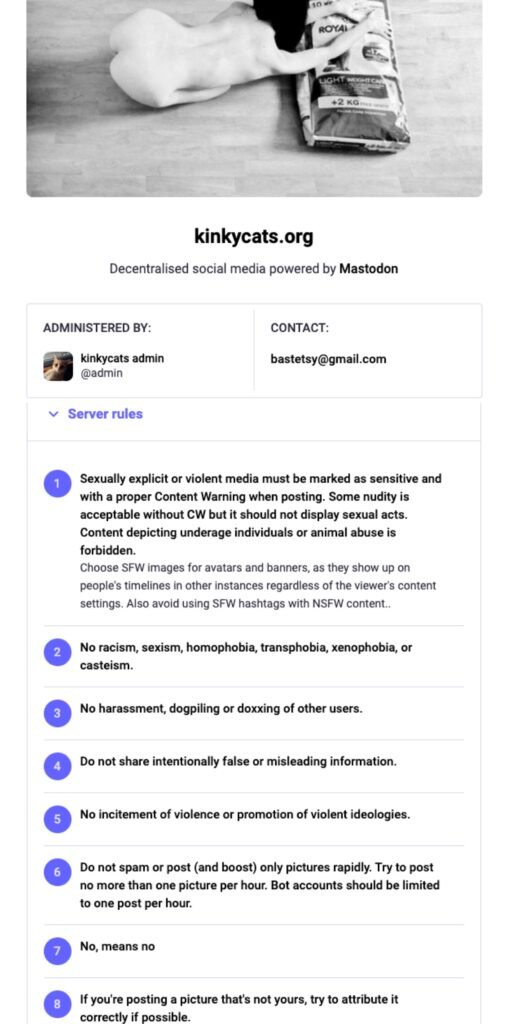
Click on the image to view it live.
Use the desktop site version to fill out your profile!
If you are using the Mastodon app or a third-party-client, they will usually automatically redirect you to the desktop site to manage account settings anyways so might as well start from your browser.
When you’re first setting up your profile, this is where you’ll be able to set your profile picture, banner and fill in a display name and your bio.
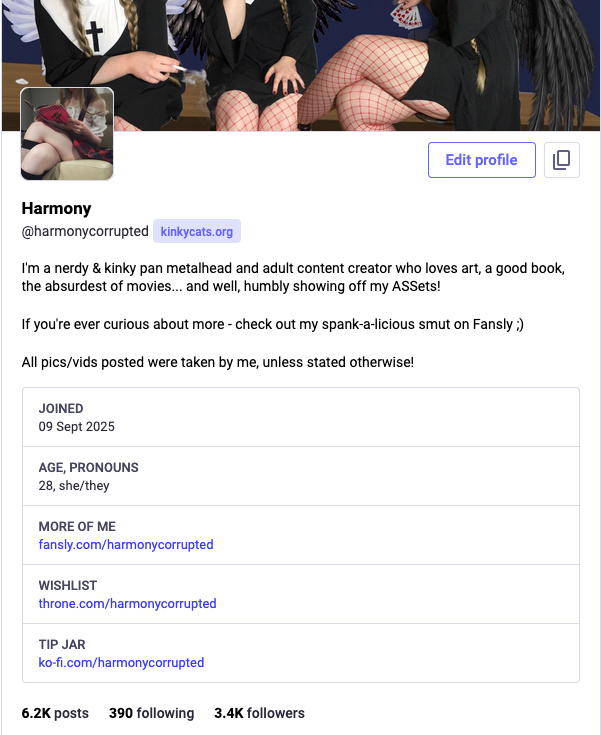
Don’t skip over this great feature unique to Mastodon: “Profile Metadata” – you can use it to neatly display and highlight your links, age, pronouns or boundaries (or literally anything else you want)!
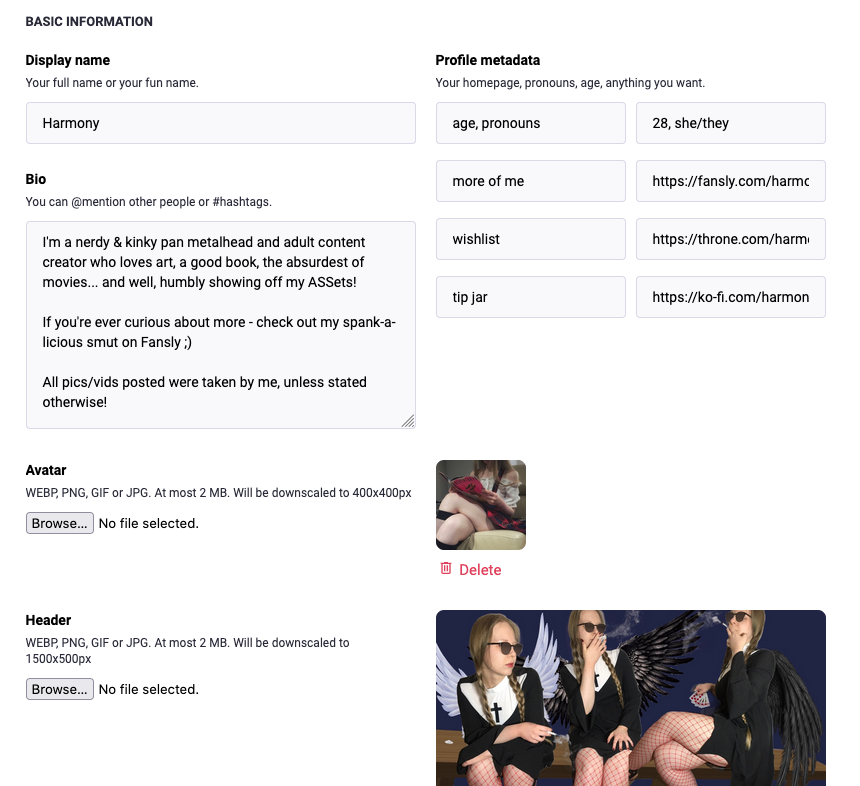
Put the headers/categories in the boxes on the left and the links/information in the ones on the right.
Post an introduction to pin to your feed!
Not sure what to do for your first Mastodon post? Just introduce yourself and attach a picture (ideally a SFW one/thirst trap for the best reach) – tell the community a bit about who you are, your hobbies/interests and what you do so they’d get to know you!
Use
#introduction,#newhereand any other hashtags that represent you best.
Prioritize pictures over videos!
This is based on anecdotal evidence only, so take this advice with a grain of salt. Usually, pictures do better than videos on average and very likely, this has to do with the flawed nature of the Mastodon video player.
If you are posting a lot of videos, you should choose a larger server that can afford the bandwidth or be prepared to tip the admin! Smaller servers are usually run by a small team or just a single person that foots the bill themselves or relies on donations.
Use content warnings!
There is no centralized moderation on Mastodon which means that if your post gets reported, the report will be sent to your server moderators and they might suspend your account if you’ll keep avoiding the use of CW(content warning)s.
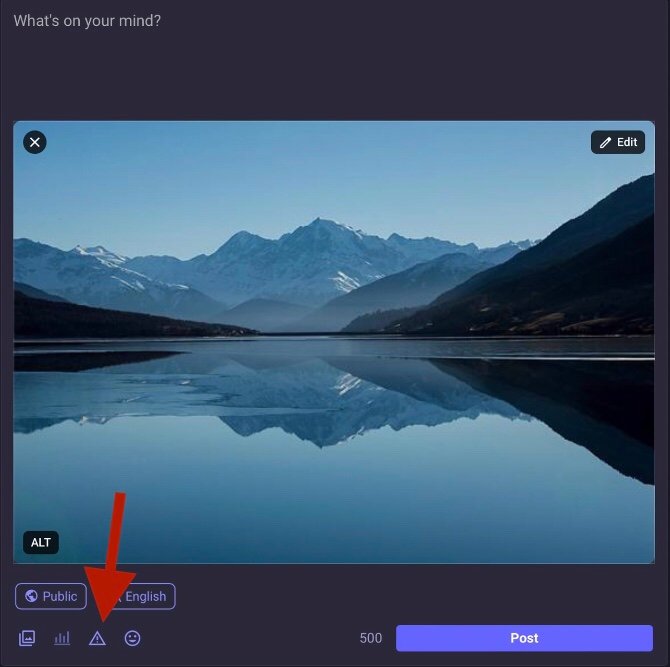
When you CW a post, any media will be blurred and your post text hidden behind a warning that can you type in yourself.

Another option you can utilize is “mark media as sensitive”. Check this if you want to upload a NSFW picture but use SFW post text. This can help you increase your reach.
Make use of hashtags!
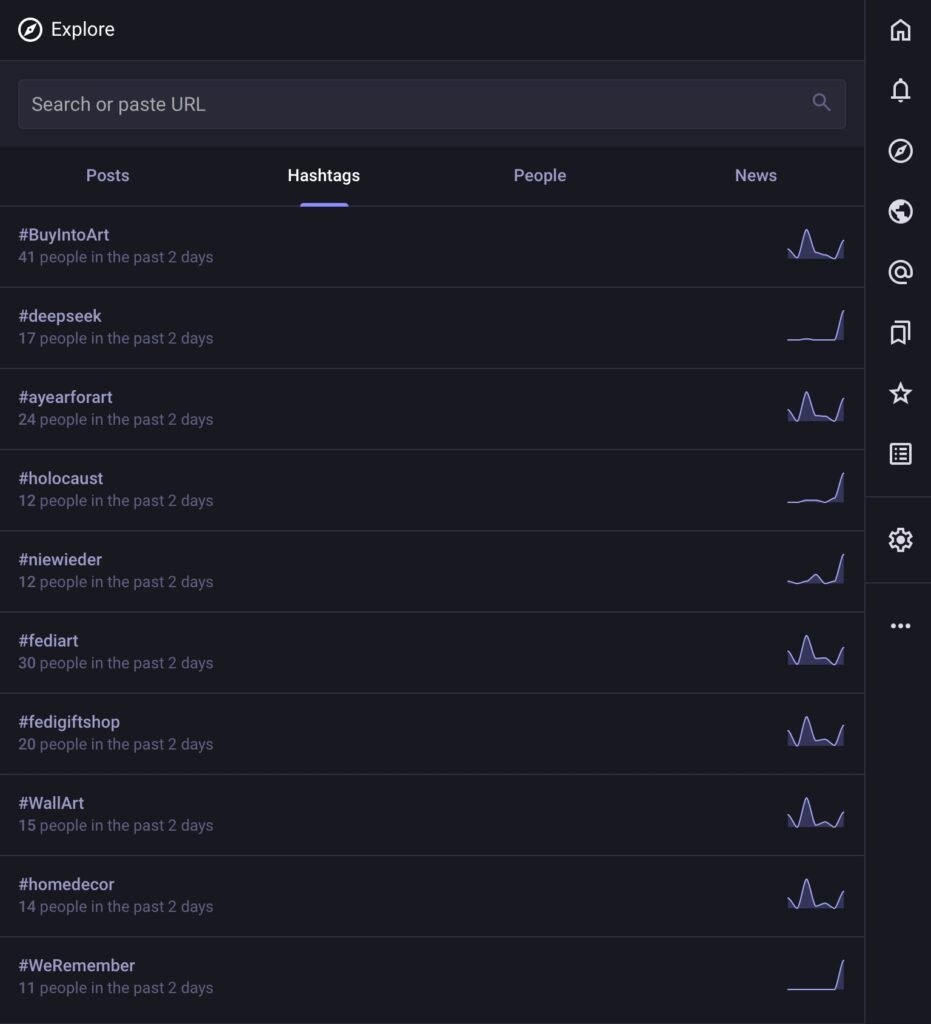
They won’t have the same effect as on the algorithm-driven platforms but will still help you a lot. You can even look up the trending hashtags or any hashtag’s popularity in multiple ways!
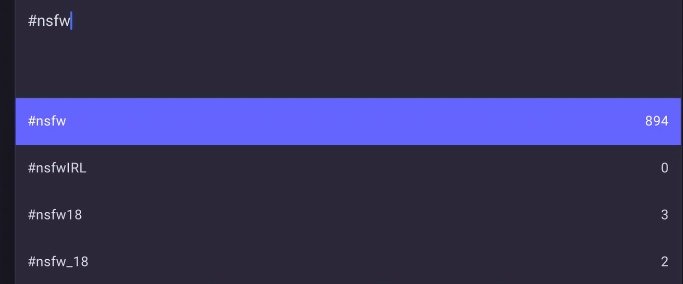
The “explore” page lets you see the trending tags and if you’ll type in a hashtag in the search or while composing a post, you will see it pop up along with the amount of people searching for it.
Pin a post, or several!
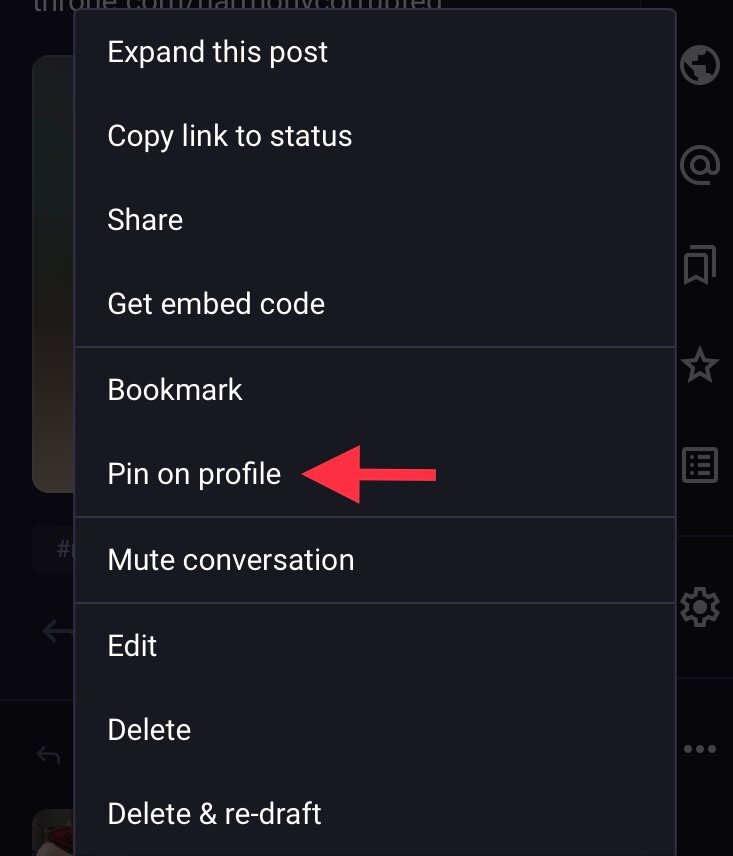
You can pin posts to the top of your profile page on Mastodon and I strongly recommend to do so!
Pick some posts that represent you best and make people aware of what you sell – this is a way to draw attention to your services and content fast! This is ultimately up to you but if you’re unsure, pin an introduction post with links to your content, a list of services you provide and the best pictures of yourself.
Here’s how you can do it:

Boost others’ posts and encourage others to boost yours!
“Boost” is Mastodon’s term for reposting (reskeeting, retweeting, reblogging). There is no algorithm on Mastodon, so making connections and boosting others’ posts is essential. The more friends you make across the Fediverse (across different servers), the more reach you’ll have!
Don’t be afraid to ask for boosts from time to time, it’s a common thing to do!
Boost your own posts – especially on days when you can’t post anything new!
You absolutely should not skip this feature if you want your posts to reach as many people as possible. Not everyone is online at all times and boosting your posts will let new people notice them. It’s a common thing to do and absolutely no one will criticize you for it. If you can’t post anything new on a certain day, this will be a godsend because you’ll be able to promote yourself without having to put out anything new and it only takes one click!
You can move servers easily if you need to!
If you’ll end up wanting to leave your server for any reason, don’t worry! You won’t lose your followers and block lists. Mastodon has got an amazing migration function that lets you switch servers fast. One disadvantage is that you will lose all your posts (including media). However, you can download them as an archive from your account settings and repost them if you’d like to. This great guide will help you move with ease.
Take advantage of automated post deletion!
If you prefer to delete older posts from time to time but forget to do it, you can set up automated post deletion. Just tick the box to the left of “Automatically delete old posts” at the top of the /statuses_cleanup page of your instance. Don’t forget to set the time threshold and the exceptions you desire before saving your changes.
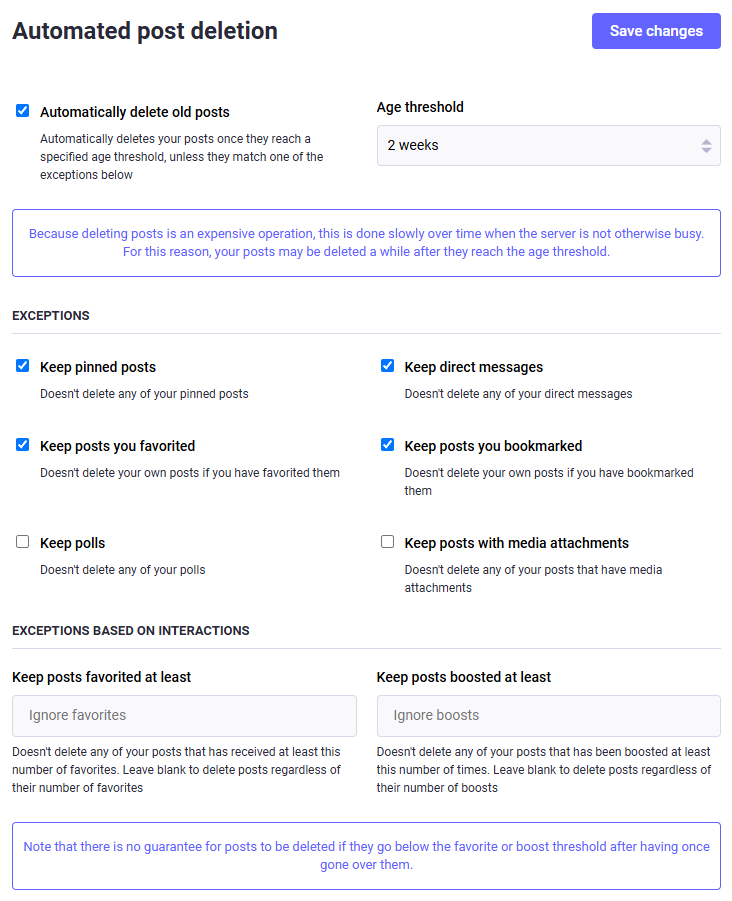
A word of caution: automating this process can be very costly, so please refrain from setting this up if you are on a very small server… or make sure to donate to your server’s admin!
To be continued! Wanted to get this out there ASAP and build on it while it’s live instead of just leaving it drafted for forever.
Written By

Contributor and Author
Leave a Reply